Players look for servers in a few places: server lists, Google, Discord and the forums of their game. GTScope gives you a free tool for each. It lists over 1,100 servers across 20 games, with over 30,000 players online right now. Here are the steps, in order.
Be where players look
Adding your server is free:
- Open the page for owners and press Add your server free.
- Fill in the name, game, country, IP or host, port and query port. Add the description, your links and a picture now: they make your page.
- Wait for approval. An administrator checks every new server; until then it is not listed, ranked or scanned. The bell at the top of the site tells you when it is approved.
Then GTScope scans it every 5 minutes and updates its ranking after each scan. A server you add is yours from the start: you manage it from your panel.
Already listed? Claim it
An address can be listed only once. If yours is already on GTScope, claim it: whoever can put a code in the server's public name owns its page. There is no approval and nothing to install.
- On the server's page, press Claim this server, then Get my code. The code looks like
GTS-XXXXXand is valid for 48 hours. - Put it in the server's name or tags, at the start if the name is long. On CS 1.6 and Source games, type
hostname "<current name> GTS-XXXXX"in the console or over RCON; no restart needed. FiveM usessv_hostname; on TeamSpeak 3, rename the virtual server. - Press Verify Now. When you see The server is yours, take the code out of the name.
It takes about a minute. A server with an owner gets:
- the Claimed by label, your own description and links;
- owner statistics, alerts, a weekly report and the list of your voters;
- credits from votes and banner clicks, and a chance at the monthly podium;
- 7 days in New on GTScope, and no auto-delete.
A page that convinces in 10 seconds
A player who opens your page decides fast: give them what they look for.
The description
The Description / Server Story field takes up to 5,000 characters. Its first words also start the description your page gives Google, if it has at least 40 characters and is not mostly capitals. Your page exists in English, Romanian, German and French, but your text starts that description only on the page in the language you wrote it in. The form shows an On Google preview.
Open with what a player wants to know: mode, maps, slots, what makes you different, when the server is full.
Write in your players' language. A Romanian description starts the Google text of your Romanian page, the one Romanian players find.
Links and gallery
Add your Discord, website or forum, YouTube and social pages. A Discord link turns a visitor into a member you can reach again. The links are "nofollow": they bring players, not Google ranking for your own site.
The gallery takes up to 10 pictures and 5 YouTube videos: show real moments, like a full round on your best map.
The mode in the name
GTScope reads the mode (Zombie, Deathmatch, Jailbreak…) from the server's name, then from the map prefix; the form has no field for it. Put the mode in the name, and your server shows up in that mode's lists.
Climb the ranking
Votes
Not everything weighs the same:
- the heaviest part is how many distinct people voted for you this month; a person's further votes count much less;
- then come the people really playing over 7 days, compared with your game's other servers, then uptime, favourites and reviews;
- a promotion adds no points.
So ten players who vote once beat one player who votes ten times. Monthly votes reset on the 1st. Your own votes, and those from your connection, never count for the ranking. Ask real players and reward the loyal ones in the game; never buy votes or make fake accounts. Fake players do not help: a server as full at night as at peak gets less.
More in How to get more votes; the full rules are on the ranking page.
Stay online
Uptime over the last 7 days counts. A silent server gets no points for activity or uptime, and after 24 hours of silence its score is 0 until it answers again. After 30 days it leaves the lists and Google's results. The alerts below tell you when it goes down.
Your server on other sites and on Discord
Banner and widget
At the bottom of every server's page, the card Banner for your site gives you a live banner in three sizes. Copy the BBCode for forums, the HTML for sites or the direct link for Discord and Steam.

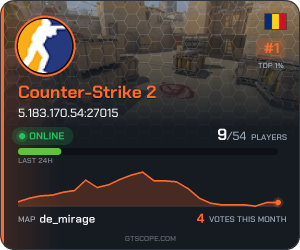

560×95 for a forum signature, 300×250 for a side column, 460×24 for a short signature. Their numbers change by themselves.
Clicks on it from other sites can pay you credits. The card Live widget for your site gives you a small code with your server live and the buttons Play, Copy IP and Vote. It pays no credits, but the visitors it brings show up in your statistics. Put them where your players already are: the banner in forum signatures, the widget on your site or your clan's. Details in Banner and widget.
Your Discord: alerts and live status
In your panel, open your server, then Alerts. They are all on by default and arrive on the bell: offline, back online, a player record, a new review, the report of the week. Tick Also send them to Discord and paste the webhook of a text channel; Send a test message checks it.
Then tick A live status message in the channel: one message that keeps itself up to date with players, map, place and a link to vote. Pin it, and your members see at a glance if the server is up.
How the live status looks in your channel

GTScopeAPP Today at 11:15

Address
5.183.170.54:27015
Map
de_mirage
Place
🥇 #1 / 207
Who plays now
20 players connected right now.

Live status · GTScope • Today at 11:15
With the figures the server has right now. Once ticked, it keeps itself up to date every 5 minutes; pin it so it stays at the top of the channel.
Promotion with credits
Credits are earned on GTScope, never bought with money. The votes your server gets pay you 2 credits for each of the first votes of the day, less after that, up to 40 credits a day. Paid banner clicks, friends you bring with your invite link (panel page Invite Friends), missions and the monthly podium pay too. A friend you invite counts once they reach level 2. From the rewards that repeat (votes, missions, banner, invitations) an account gathers at most 1,200 credits a month; past that, it earns XP only. Credits cannot be transferred or cashed out.
You spend them on promotion places: Bump, Highlight, Game Category Page, General Server List, Homepage and Combo (Everywhere). The last four have a few seats each; when one is full, you wait in line and your credits wait with you. A promoted server that is down is not shown and gets that time back.
A promoted server is labelled Promoted and keeps its place in the ranking: promotion shows it in more places, it does not move it up. Prices are on the page for owners, the rules on the credits page.
Measure what works
In your panel, open your server, then Statistics. Visitors of the server's page compares the last 30 days with the 30 before: visitors, Play presses and IP copies, and where people came from (Google, the site's lists, your banner, your widget, Discord, social networks, other sites). Below are your players: unique and loyal ones, Peak hours and the maps that bring or lose players.
Every Monday the weekly report sums up the week on the bell and in Discord: your place, average players against the week before, votes and Play presses.
Change one thing at a time and look again a week later. Many visitors but few Play presses mean the page does not convince yet.
Next steps
- Add your server, or claim it if it is already listed.
- Plan this month's votes with How to get more votes.
- Running CS 1.6? Read how to fill a CS 1.6 server.